Warehouse Modeling
Warehouse Modeling is where you define the physical layout of your warehouse. A warehouse typically consists of the following components:
Warehouse: The warehouse is a self-contained physical unit. Within the warehouse, goods movements are controlled by driving commands and carried out by internal equipment such as forklifts, pallet trucks, etc. Movements of goods do not constitute a legal transfer to other undertakings. Movement of goods between warehouses is typically mapped with transports and shipments.
Storage areas: Storage areas are structural subdivisions of the warehouse. These can be, for example, floors or adjacent halls.
Aisles: In a high-bay warehouse, there are aisles between the individual racks that provide the necessary space for goods handling. They are driven through with various equipment and are usually sorted in a certain order.
Racks: Within an aisle, there are racks — usually one on the left and one on the right. However, multiple racks can also be modeled on each side of the aisle to represent interruptions for escape routes..
Compartments: The shelves are divided vertically into columns and horizontally into levels. Thus, each compartment in a high rack is located in exactly one column and on one level. The compartments are bounded vertically by uprights and horizontally by beams.
Bins: A tray is divided into several bins. Often there are 3 or 5 places for the respective number of Euro pallets.
Gates: Gates are special storage locations for incoming goods or goods issue. Technically, you will be represented with compartments that have the property Entry Place or Exit Place.
Differential Locations: Difference Locations are bins that are used for inventory adjustments. If, for example, in the case of a goods retrieval, the requested quantity is not available in the storage bin, the difference is written off to the difference location. If exactly this item is later found in another storage bin, then the stock is posted from differential bin to the actual storage bin. In the best case, the differences cancel each other out continuously. The difference bin is the only storage bin where an item stock may also go minus.
Note
Inventory can only be posted to storage bins. Technically, a collo is used for this. On all other components, never inventory can be posted directly.
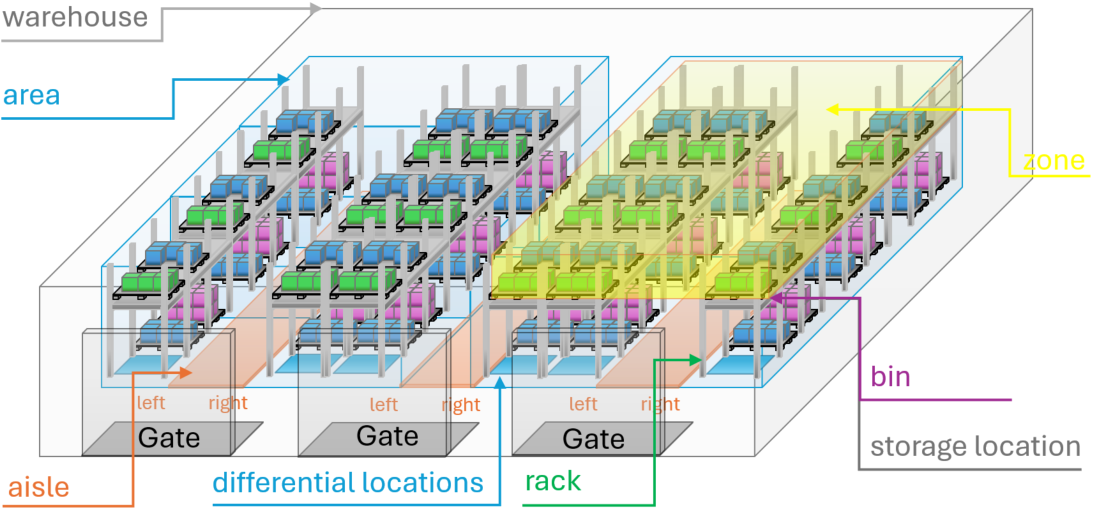
Warehouse Modeling
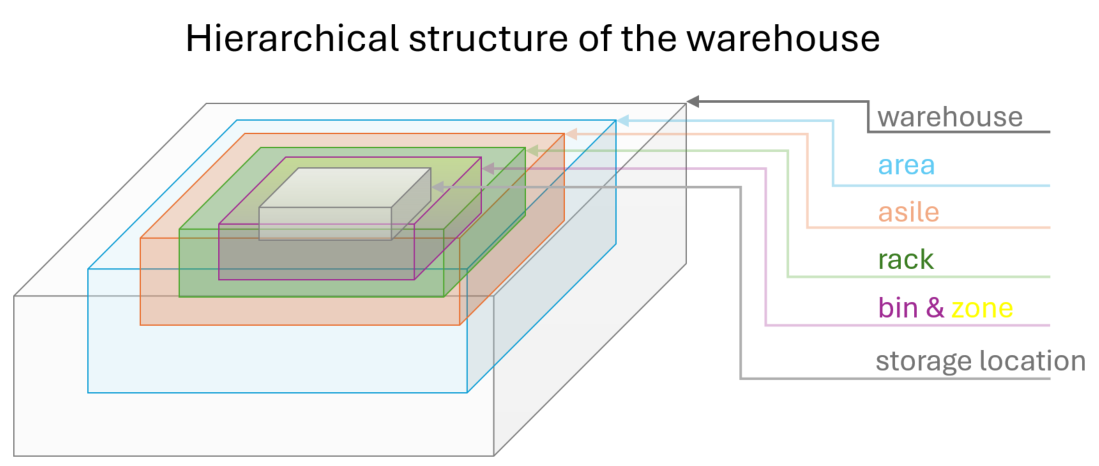
The components of a warehouse are arranged in a hierarchical structure. This is necessary to represent logical processes and to meaningfully define rules for storage and retrieval operations.
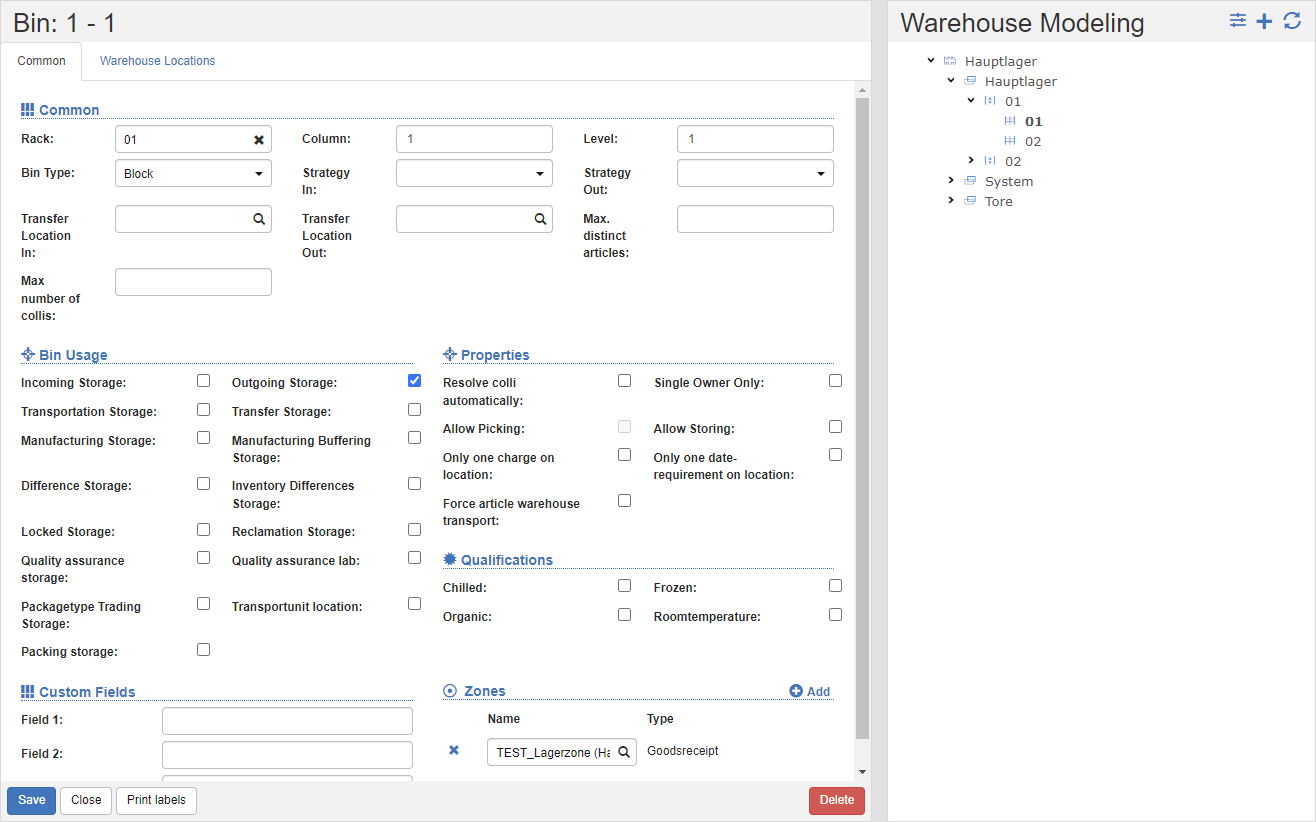
In warehouse modeling, you can see a hierarchical tree on the right with the warehouse components from the warehouse to the shelves.
To the right of the tree you can see the properties of the currently selected component. The components compartments and storage bins can be found in the respective properties.
Create a new warehouse
- In the title action bar, click on the action Create new warehouse.
- Enter the name and the responsible organizational unit of the warehouse. Setting the organizational unit controls access permission. This is where the master data filter comes into play. See also Authorization Concept.
- Click the Save action.
Note
The procedure described above is similar for all components of warehouse modeling.
Creating new components with the generator
Use the generator to quickly and easily create the typical components of a high-bay warehouse.
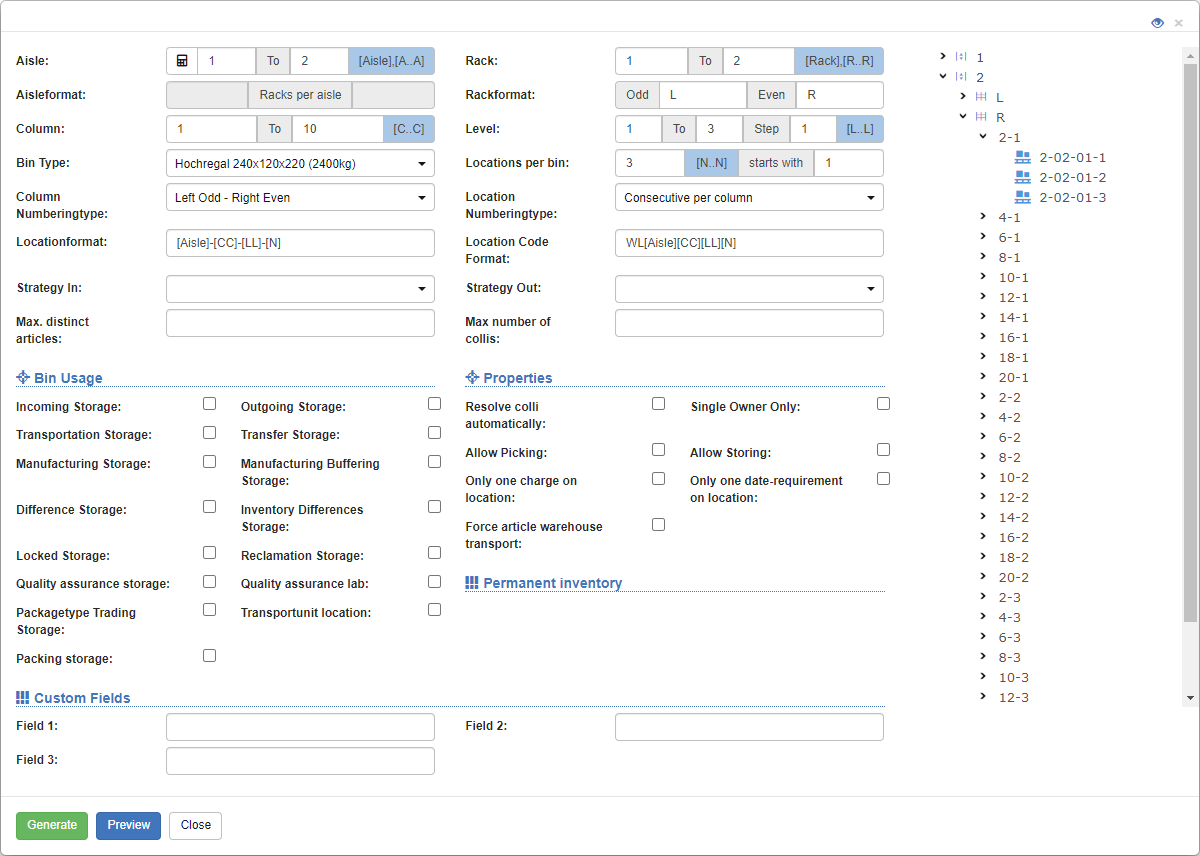
In the tree view, click on the components under which you want to generate child components.
In the title action bar of the selected component, click on the action Generate.
You will now see the Generator Dialog. Depending on the entry point, the parent components appear inactive. For example, if you enter gear 2, the Aisle from and Aisle to fields will be inactive.
In the fields for the components, specify the limits for the creation. In the example above, the following components are generated:
- Courses 1 to 2
- with one left and one right shelf
- per shelf, 10 columns (1 to 10)
- divided into 3 levels
- per compartment, 3 storage locations
Use the options Columns Numbering Type and Place Numbering Type to define whether the numbering should be sequential or left-odd, right-even, etc.
Use placeholders in the Bin Format and Bin Barcode Format fields to determine the name and barcode of the bins:
- Aisle: [Aisle]
- Column: [C]
- Level: [L]
- Place: [N]
Tip
> **Repeat** the wildcard character for **multi-digit numbering**.
>
> **Example**: [CCC] creates 3-digit columns (leading 0), so 001-029.
Provide additional information such as subject type, as well as properties and use of the subjects.
Click on the Preview action to see the components you want to create in a tree view on the right.
Once you're happy with the preview, click the Generate action. The system creates the components in the background.
Storage Bin Usage
The type of use of the storage bins is defined on the tray. The following types of use are available:
Incoming Storage: Specifies that the bins are used as receiving bins. These locations can be selected in the notification and in the goods acceptance masks.
Outgoing Storage: Specifies that the bins are used as ISP bins. These locations can be selected in the pick list and in the outgoing goods screens.
Transportation Storage: The storage space is used to map movements. When an item or collo is picked, it is temporarily transported to the transport site. In the course of depositing, the item or collo is posted back to a regular storage location.
Transfer Storage: Serves as an exchange point between two warehouses.
Manufacturing Storage: Specifies that production can take place in these bins. Both assembly and disassembly are possible in these places.
Manufacturing Buffering Storage: For larger production facilities, it may be necessary to prepare more raw material than is used directly. In order to ensure clarity at the manufacturing station, buffer stations are used.
Difference Storage: Are bins that are used for inventory adjustments. If, for example, in the case of a goods retrieval, the requested quantity is not available in the storage bin, the difference is written off to the difference storage. If exactly this item is found in another bin at a later date, the stock will be posted from the difference bin to the actual storage bin. In the best case, the differences cancel each other out continuously. The difference bin is the only storage bin where an item stock may also go minus.
Inventory Differences Storage: Automatically created in the course of inventory creation and serves to delimit differences that arise in the course of inventory.
Locked Storage: Provides the possibility to lock items and/or colli by transferring them to a Locked storage. The stock on a locked storage is not available for classic picking. Access to the blocked stock can be controlled via settings.
Reclamation Storage: After goods have been received for an RMA order, these storage locations are preferred as destinations for outgoing orders for the transferred goods.
Quality Assurance Storage: Specifies that the storage bins can be selected as the target for a QA. If larger tests are to be carried out, the goods are temporarily stored at these locations and only partial quantities are transferred to the Quality Assurance Lab for testing.
Quality Assurance Lab: QA tests always take place at a specific Quality Assurance Lab. The goods required for the inspection must be relocated in advance.
Loading equipment exchange place: obsolete
Transportunit Location: If the packaging material is to be inventory-kept, then equipment stations are used to manage the inventories. In the course of packaging, the inventory in the equipment bin is reduced according to the configuration.
Packing Storage: Is used to pack prepared orders within its zone. The packing storage location can be selected in the fine picking process.
To now represent a simplified goods receipt process and goods issue process, the following storage location usages are required.

Storage Location Properties
Colli autom. Dissolve: Specifies that colli that are posted to these bins are dissolved. This means that the entire stock of the Collo is transferred to the storage bin. After that, the Collo no longer exists. Technically, there is also a collo with the number of the storage bin and a "_" sign in front of it on a dissolved storage bin. This collo is permanently connected to the dissolved storage bin and cannot be moved away from it.
Single Owner Bin: Ensures that only goods from a single owner may be stored in this bin. Goods that have a different owner cannot be stored here.
Picking allowed: Specifies that goods may be taken/picked from these locations. This setting is typically active in high-bay storage bins.
Storage allowed: Specifies that goods may be stored in these slots. This setting is typically active in high-bay storage bins.
Only one batch per bin: Specifies that these bins may only store a single batch number per item.
Only one date request per bin: Specifies that these bins may only store a single best-before date or expiration date per item.
Enforce Article Drive Commands: Ensures that all Drive Commands with this destination or source are Article Drive Commands. Collo drive commands are already converted during the installation.