Production
In production, all production orders can be processed,
- which have previously been released in the production disco
- and their required raw materials have been delivered in full to the desired production site.
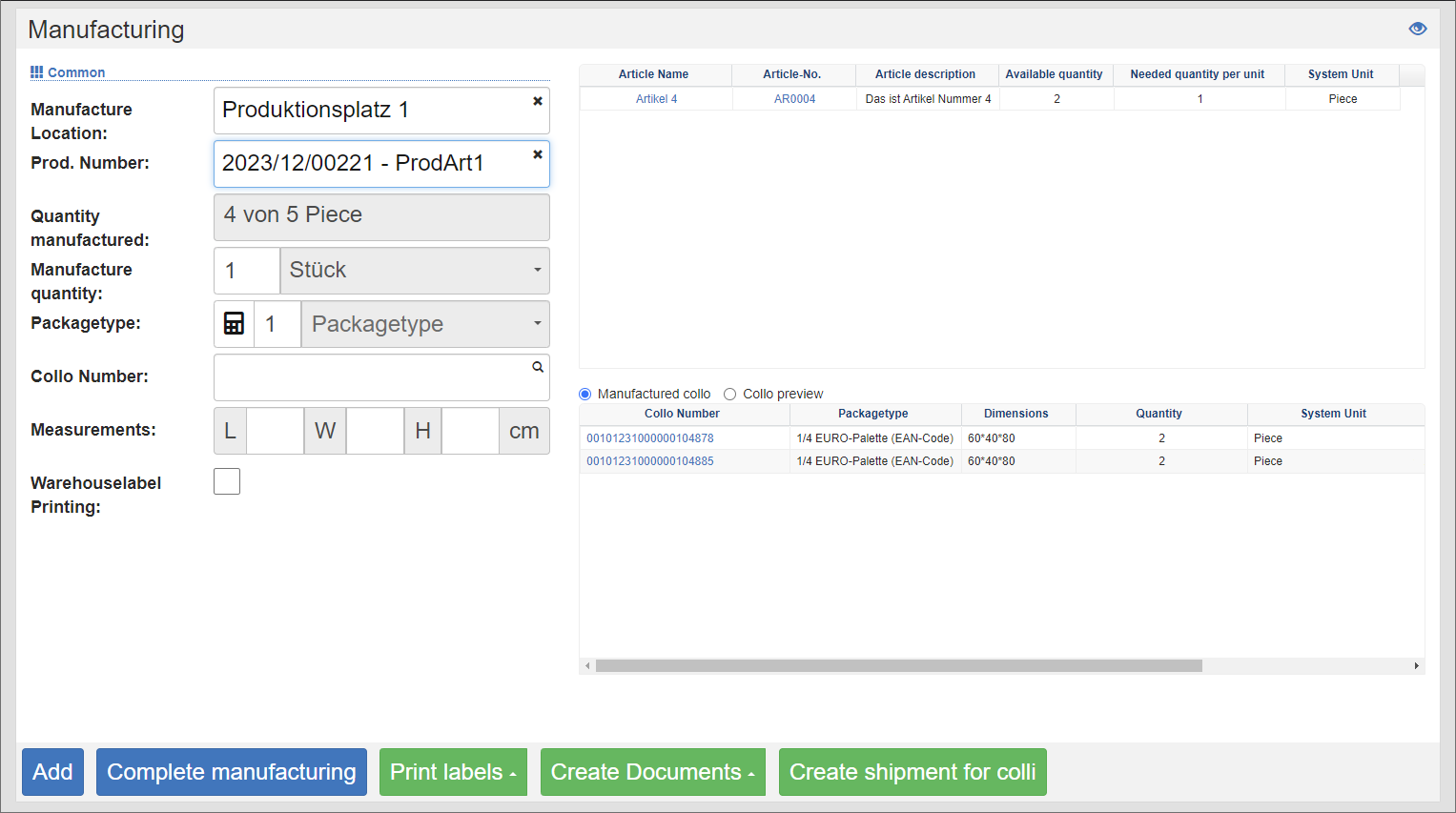
Carry out production
- In the Production Facility field, select the production facility where you want to produce.
- Then enter the production number, which is the order number of the production order.
- You will see the raw materials required for this position in the list on the right.
- Record the production quantity and target collo, as well as its weight and dimensions. The target collo is the loading device on which the finished items are placed. If you leave the Collo Number field blank, a collo number will be drawn from the designated number range when saving.
- Click the Add action. The manufactured quantity is added to the production order.
- In the list below on the right, you can see the colli already produced for this position.
Complete production
To complete the production of an order, click on the Complete action. Depending on the quantity produced and the settings for under- or overdeliveries on the order item, it is checked whether the order can be completed. If the check is positive, the driving commands for the produced items are created according to the stored putaway strategy.
Dismantling overdraft
If the individual parts of an already produced item are needed (e.g. ballpoint pen from a writing set), an existing stock of a manufacturing item can be dismantled with a dismantling order and thus the stock of the contained raw materials can be restored.