Loading scan
With the loading scan you book a colli on the currently selected transport. By loading, you document which colli were loaded on a specific transport and thus also the handover to the shipping partner. The process ensures that:
- no colli is loaded onto a wrong transport and
- All colli intended for loading have been fully loaded.
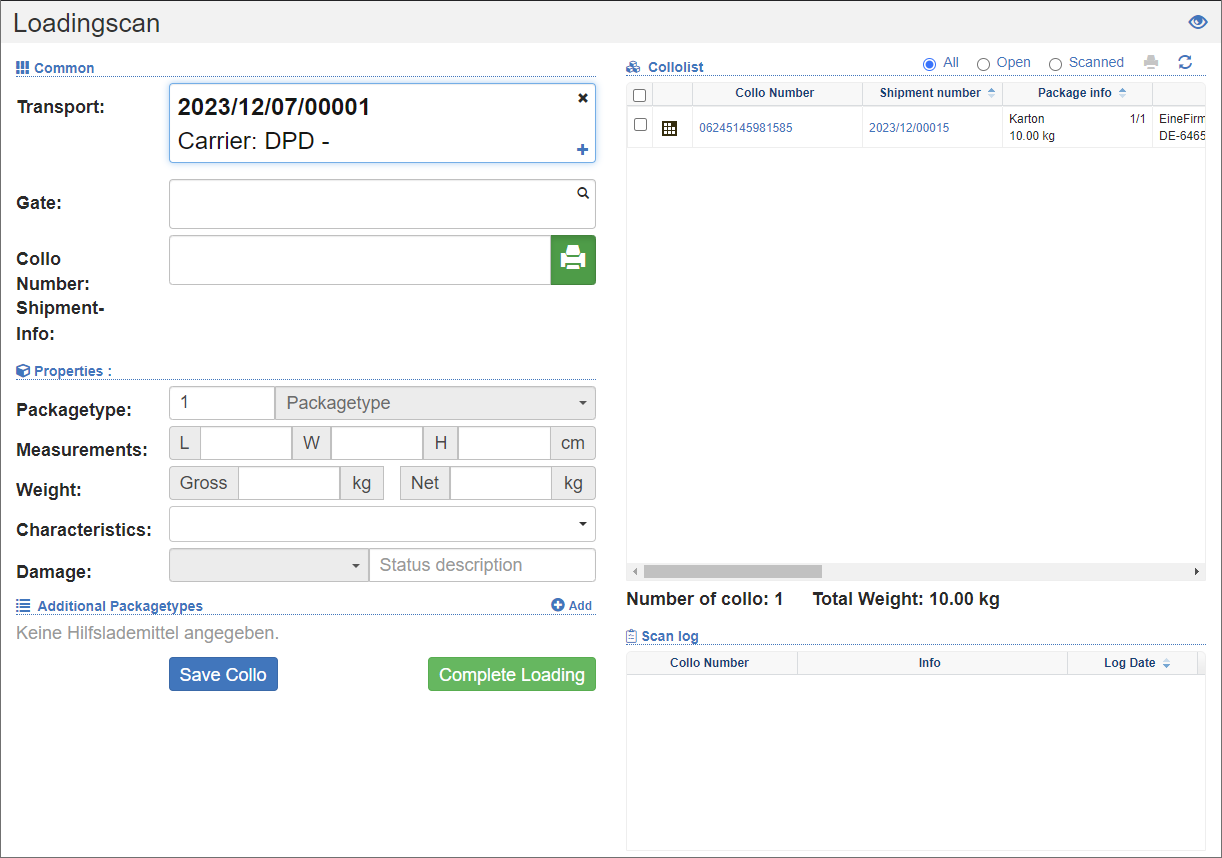
Loading
- Select the transport for which you want to carry out the loading.
- Specify the gate where the loading process will take place. If you are using monitoring systems , you can analyze the processes during loading.
- Scan the collo numbers of the packages.
- When scanning, the stored collo data is displayed in the Properties area. If you notice any discrepancies, change the data such as loading equipment, dimensions and weight.
- Optionally, record any damage.
- If you have changed data, click on the Save Collo action.
- Repeat the process for all collis until all collis have been loaded.
- Complete the loading, see Complete Loading.
Colloliste
By selecting the transport, the Colloliste is displayed on the right. In this list you can see the progress of loading. Each successfully scanned colli is highlighted in green in this list. In addition, below the list you can see the number and weight of the Colli that has already been loaded.
You can filter the collo list to show either all, open, or scanned colli.
Scan Log
At the bottom right, the scan log is displayed. For each loading scan, the Collo gets a loading scan status (LSC).
To change collodata afterwards:
- Click on the corresponding line in the scan log.
- Change the data in the collo properties.
- Click on the Collo Save action.
Complete loading
To complete the loading, click on the Complete Loading action.
As a result, the transport will be upgraded to the status  Loading scan completed. No more collis can be loaded.
After the loading is complete, various processes are initiated, depending on the configuration:
- Only after completion of loading does the data transfer to the shipping partner take place.
- Colli (shipments) that have not been loaded will be removed from the shipment and posted to a new shipment.
- Colli that have not been loaded will be posted to the unscheduled area of the transport dispatch.
- If partial deliveries are permitted, shipments will be shared where not all colli have been loaded.